FAQs
Here you can consult the answers to the most frequently asked questions regarding Open Badges and use of the Badges received
It is a digital object that certifies the skills acquired by people in all educational and experiential contexts.
Lo standard infrastrutturale aperto (OBI) ideato da Mozilla Foundation, gli conferisce la speciale caratteristica di poter supportare dati e informazioni ricche di contenuti utili per identificare il badge e qualificare le persone che lo ricevono. Non solo immagini quindi, che rappresentano la parte esterna e visibile del badge, ma anche un'infrastruttura interna; per cui, grazie alla sua "anatomia", l'Open Badge è:
Lo standard infrastrutturale aperto (OBI) ideato da Mozilla Foundation, gli conferisce la speciale caratteristica di poter supportare dati e informazioni ricche di contenuti utili per identificare il badge e qualificare le persone che lo ricevono. Non solo immagini quindi, che rappresentano la parte esterna e visibile del badge, ma anche un'infrastruttura interna; per cui, grazie alla sua "anatomia", l'Open Badge è:
- Evidence based: it contains data and information capable of objectifying its contents
- Archiveable: badges can be collected and stored online
- Transportable and transferable as it is interoperable: the badges together with the data and information they contain can be shared online and on the main social networks
Issuers are all those who carry out training activities and wish to enrich the value of the result of their activity through the creation and issuance of C-Box open badges for the digital representation of knowledge, skills and competences acquired by people in different training and experiential contexts.

- 1EdTech is a consortium that defines the technological standards of EdTech solutions at an international level and verifies their correct application, so as to guarantee the interoperability of Open Badges.
The Emilia Romagna Region Open Badges Open Badges 3.0 platform is 1EdTech Open Badges 3.0 certified, guaranteeing the interoperability of badges: they can in fact be managed, including, hosted and shared by all social networks and platforms that make use of digital badges.
The Emilia Romagna Region Open Badges Open Badges 3.0 platform is 1EdTech Open Badges 3.0 certified, guaranteeing the interoperability of badges: they can in fact be managed, including, hosted and shared by all social networks and platforms that make use of digital badges.
It is the final recipient of the open badges issued by the Issuers.
Users can:
• View the badge acquired
• Keep the badge in their personal space (backpack) on the platform
• Insert the badge as a certification on Linkedin
• Integrate the badge into their digital CV
• Insert the badge at the bottom of the e-mails.
Users can:
• View the badge acquired
• Keep the badge in their personal space (backpack) on the platform
• Insert the badge as a certification on Linkedin
• Integrate the badge into their digital CV
• Insert the badge at the bottom of the e-mails.
Per condividere il tuo Open Badge è necessario registrarsi alla piattaforma tramite SPID. Una volta eseguito l'accesso, visita la sezione Badge e clicca sull'immagine grafica del badge che vuoi condividere. Si aprirà una nuova schermata. Premi sopra il tasto "la tua credenziale": 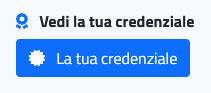 You will be redirected to the detailed page of the badge, where you will find — among other information — the buttons for sharing your credential.
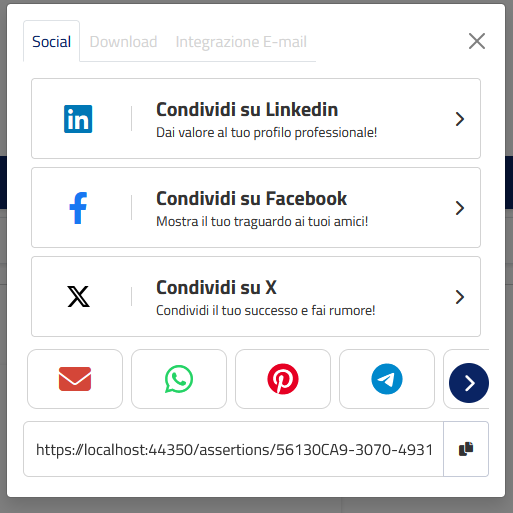
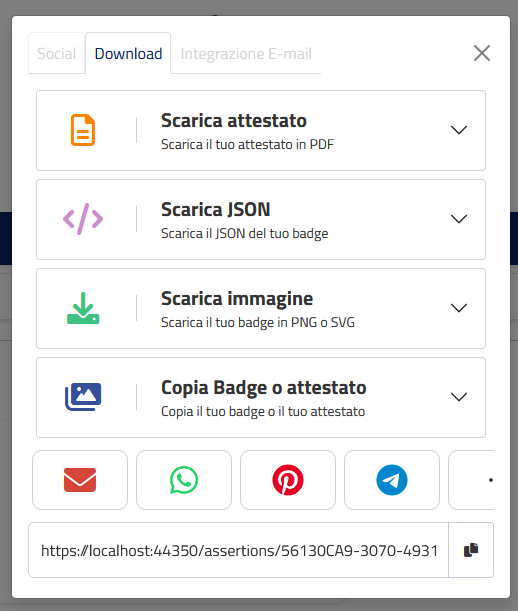
You will be redirected to the detailed page of the badge, where you will find — among other information — the buttons for sharing your credential.
Share:
By clicking on the Share button, a window will open with all the available options. By selecting the desired social network — LinkedIn, Facebook or X (formerly Twitter) — you can automatically publish a post announcing the achievement of your badge.
Discharge:
Clicking on the Download button will open a window with all the available export options. Select the format that best meets your needs:
Download certificate: generates a PDF file with the information contained in the badge.
- The classic format has all the official details.
- The v.1 and v.2 versions are simplified digital certificates, ideal for more visual and concise sharing.
Download JSON: allows you to download the JSON file of your badge. JSON (JavaScript Object Notation) is a structured file format that contains all the technical and detailed information of your badge in a form readable by computer systems. It is useful, for example, to integrate the badge into digital platforms, skills portfolios, or business systems.
Download/Copy Image: It allows you to download the digital badge image in SVG or PNG format, or copy the image to paste it into a document.
Did not find the answer you were looking for?
Contact us!